Back

College Admission Counselling System

From admission setup to counselling.

A staff-facing admissions system that brings programme setup, call lists, counselling batches and live seat selection into one connected workflow.

Admissions Operations · Staff-facing Web App · UX/UI Design

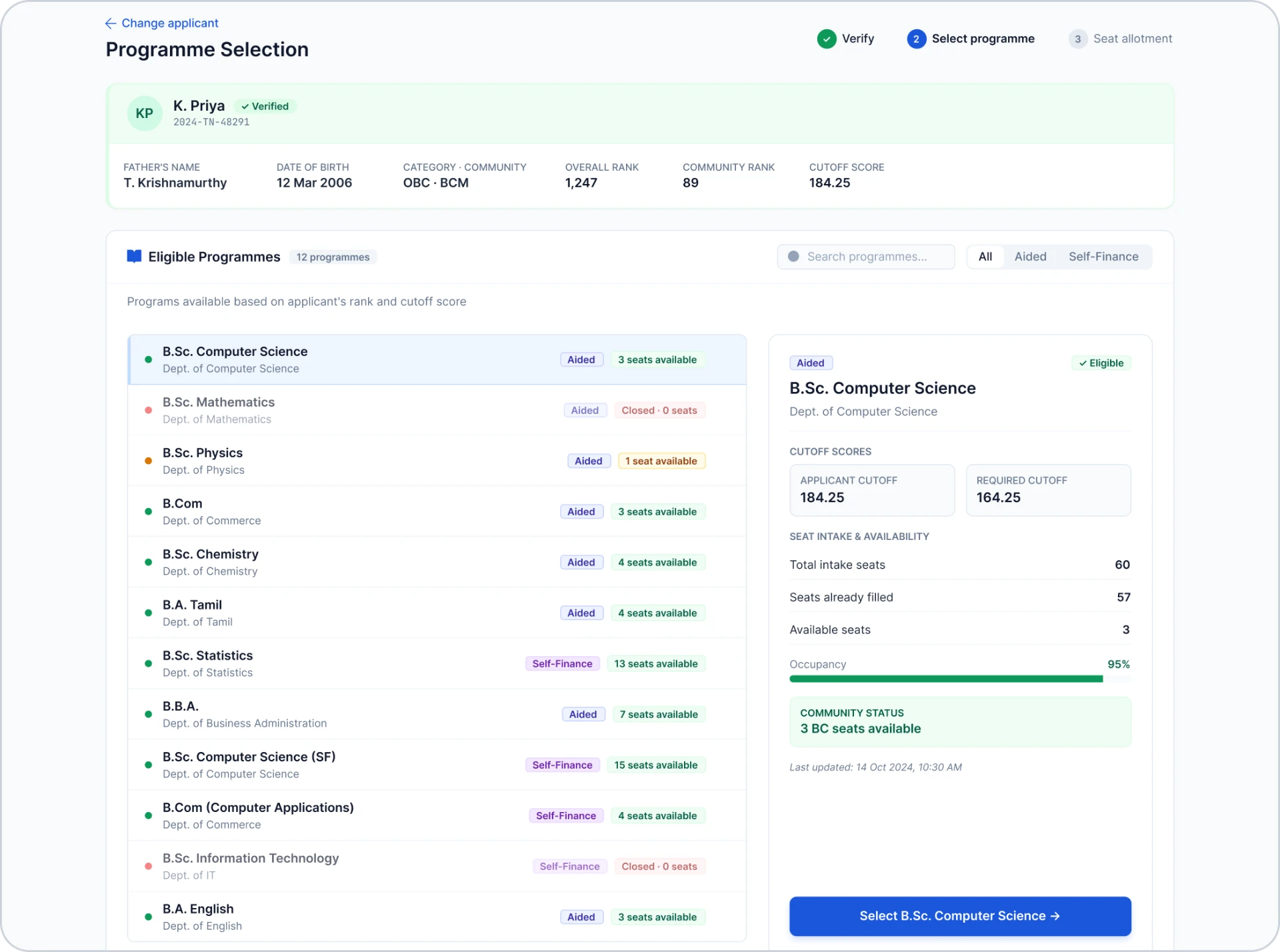
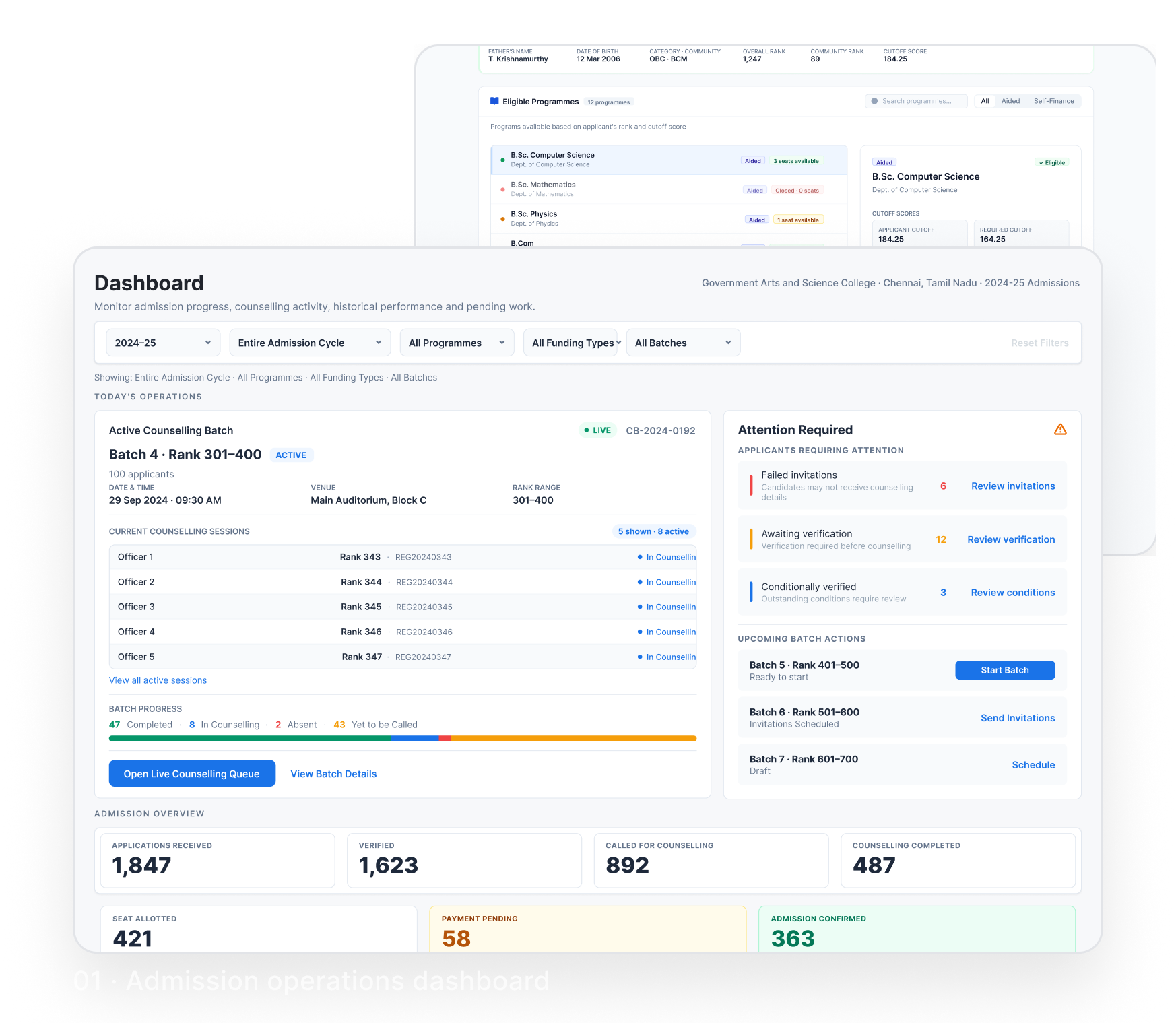
Two staff screens from the system. 01 · Admission operations dashboard, showing the active counselling batch, attention-required actions and admission totals. 02 · Live counselling interface, showing eligible programmes with labelled seat availability for the selected applicant.

01 / Project overview

A connected workflow for admission operations.

The College Admission Counselling System supports staff at SG College of Arts and Science in preparing admissions and running counselling sessions. It brings administrative preparation and live seat selection into one staff-facing application.

At a glance

Type
Staff-facing web application
Primary users
Admission and counselling staff
Student participation
Views the mirrored counselling screen
My role
UX/UI Designer, involved in the original system’s build

Operational coverage

Prepare admissions
Programme setup · Call lists · Counselling batches
Monitor operations
Dashboard
Run counselling
Applicant verification · Eligibility review · Seat selection

02 / Problem & context

Two sides of admissions.
One coordination problem.

Admission preparation and live counselling depended on staff keeping separate records aligned.

A / Admission administration

Preparation relied on manual coordination.

Staff kept preparation records across separate Excel copies and reconciled updates manually. Workflow knowledge remained with individual staff members.

A colleague’s absence could disrupt continuity.

Two sources of administrative friction

Swipe to explore →

  • Separate Excel copiesleads toRepeated reconciliation
  • Knowledge held by individualsleads toDifficult staff handovers

Synthesised from documented project context.


B / Live counselling

Seat updates could lag behind decisions.

Counsellors manually checked applicant details and seat availability across desks. Delayed updates could leave two counsellors offering the same seat.

Staff resolved conflicting offers while students waited for confirmation.

When two desks offered the same seat

Delayed updates left both desks showing availability.

Swipe to explore →

Counselling desk A
Seat appears available
Counselling desk B
Seat appears available
Same seat offered to two students

Synthesised from documented project context — simplified as a workflow illustration.

03 / Research basis

Project experience,
with a broader perspective.

My involvement in the original system's build provided firsthand context on admission preparation and live counselling. Secondary research added perspective from public discussions of admission workflows.

A / Direct project experience

What surfaced at SG College of Arts and Science

  • Preparation records maintained across separate Excel copies.
  • Manual reconciliation and dependence on individual staff knowledge.
  • Repeated verification and seat checks across counselling desks.

B / Secondary research

What public discussions suggested

  • Staff workload from coordinating dependent admission stages.
  • Document-verification delays and uncertainty about seat availability.
  • Student uncertainty about application status and next steps.

Research scope: Secondary research provided directional context, not a formal primary study with SG College of Arts and Science students or staff.

04 / People & context

Different responsibilities,
for one connected process.

Staff prepare and manage admissions, counsellors guide live sessions, and students follow their information while making a course choice.

Admission staff / Prepare & manage

Keep preparation coordinated.

Needs:

  • Prepare call lists from ranked applicants and organise counselling batches.
  • Check the selected applicants before creating a call list.
  • Keep shared information available when another staff member takes over.

Counsellor / Run the session

Guide the session accurately.

Needs:

  • Verify the correct applicant and recover from a wrong selection.
  • Review eligible courses and current seat availability.
  • Guide seat selection without repeated cross-checking.

Student / Follow & choose

Understand the choices.

Needs:

  • Recognise their information on the mirrored screen.
  • Understand eligible courses and available or unavailable seats.
  • Make an informed course choice with the counsellor's guidance.

Staff operate the application. Students view the mirrored counselling screen and make their course choice.

Role contexts synthesised from documented project experience. Staff responsibilities may overlap.

05 / The existing journey

Delays accumulated,
and uncertainty followed.

These key moments trace the manual coordination behind admission preparation and counselling. Separate records and delayed updates could extend the wait for confirmation.

Swipe horizontally to explore all five stages →

Existing journey across five stages. Stages 1–2: administrative preparation; 3–4: live counselling; 5: administrative follow-up.
01Prepare call lists02Verify applicant03Check seats04When offers conflict05Reconcile records
Staff activity
Prepare call lists from ranked applicants across separate Excel copies.Check applicant details and supporting documents.Confirm seat availability with another team.Recheck and resolve competing seat offers.Merge counselling-desk records at the end of the day.
Student experience
Wait for the counselling invitation.Wait while details are checked.Wait to learn which options remain.Wait while the conflicting offer is resolved.Some students remain without confirmation.
Where friction builds
Separate copies require manual updates.Repeated checks slow the session.Updates can lag behind decisions at other desks.Conflict point: Conflicts interrupt the counselling flow.Unresolved cases may carry into another day.

Staff carried the work of keeping records aligned; students experienced the resulting uncertainty.

Selected moments synthesised from the documented Excel-based workflow and project context.

06 / Constraints & priorities

Coordinate the preparation.
Clarify the decision.

Administrative preparation needed shared records and continuity. Live counselling needed current information and clear choices.

  1. Constraint A:

    Separate records. Repeated coordination.

    Preparation records depended on manual updates across staff.

    Design priority:

    Bring preparation into a shared workflow.

    Keep call lists and counselling batches in shared records, prepared from automatically ranked applicants.

  2. Constraint B:

    Knowledge held by individuals.

    A colleague's absence could disrupt work when context remained in personal records or memory.

    Design priority:

    Keep information available across staff.

    Use shared records so authorised staff can understand the current state and continue the work.

  3. Constraint C:

    Multiple desks. Changing availability.

    Counsellors made seat decisions at the same time.

    Design priority:

    Coordinate seat decisions across desks.

    Pair current seat information with allocation controls that prevent competing offers.

  4. Constraint D:

    One operator. A shared view.

    The counsellor operates the interface while the student follows on a mirrored screen.

    Design priority:

    Support clear choices and correction.

    Make applicant details and seat states readable and allow applicant corrections.

07 / Information architecture

Connect preparation,
monitoring and counselling.

The designs group staff work into three functional areas: preparing admissions, monitoring operations and running counselling. Applicant search and verification leads into programme selection within the counselling flow rather than forming a separate area.

Monitor operations

  • Operations dashboard

The dashboard follows the following areas:

Prepare admissions

  • Programme setup
  • Call lists
  • Counselling batches

Uses applicant ranks generated automatically from submitted marks.

Run counselling

  1. Applicant search & verification
  2. Programme selection & seat availability
  • Staff work area (filled)
  • Step within a live counselling session (outlined)
  • Followed on the operations dashboard (dashed)
Applicant search and programme selection are steps within a live counselling session, not separate areas of the system.

08 / Design decisions

Connect the preparation.
Support the counselling.

The design covered admission preparation, operational monitoring and live counselling. The following decisions explain how each part supported staff and the students they guided.

A / Programme setup

Make programme capacity and seat distribution clear.

Context
Staff needed to manage each programme's sanctioned seats, sections, session timings and seat distribution.
Design response
The interface separates programme settings, sections and seat distribution. Staff can edit section capacities and timings, configure quota allocations, and review assigned and remaining seat totals before saving changes.
Design rationale
The aim was to make the relationship between overall capacity, section seats and quota allocations easier to review during admission preparation.
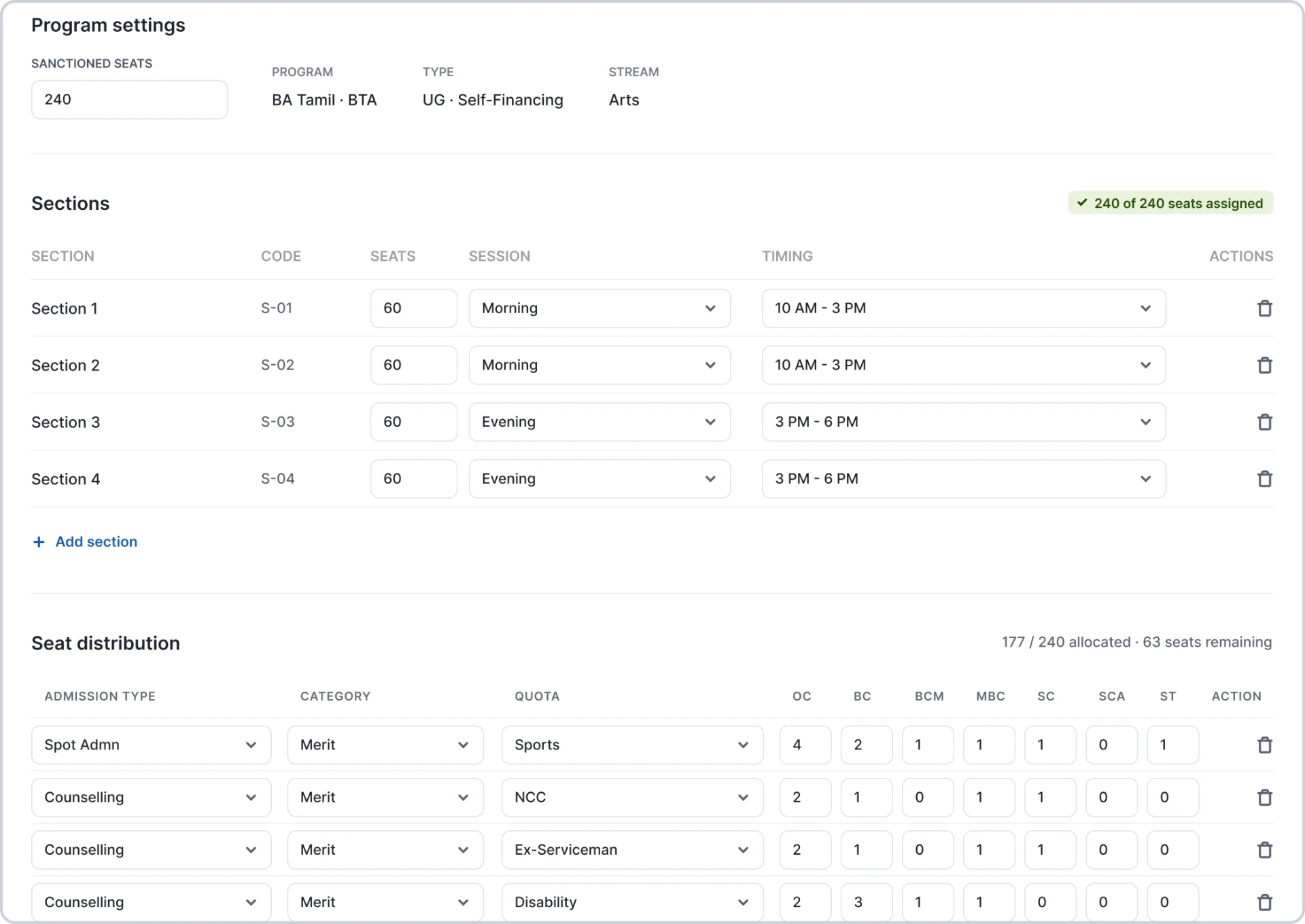
Programme settings for BA Tamil with 240 sanctioned seats, four 60-seat sections with session timings, and a seat distribution table by quota and community showing 177 of 240 seats allocated

B / Call lists

Prepare counselling call lists from ranked applicants.

Context
Applicant ranks were generated automatically from submitted marks. Staff used the ranked applicants to decide which rank range to call for counselling on a particular day.
Design response
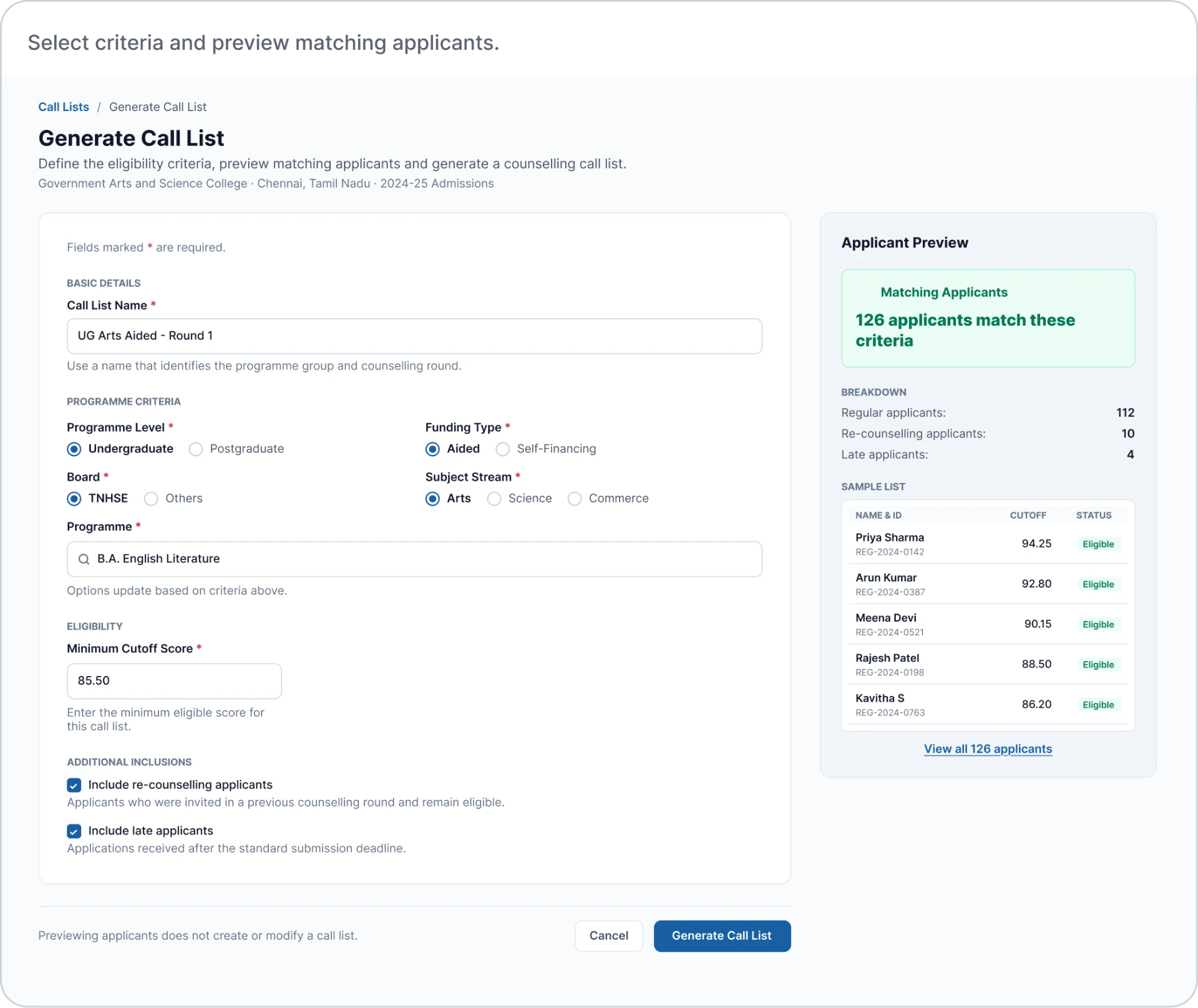
The call-list interface groups programme criteria, a minimum cutoff score and optional inclusions for re-counselling and late applicants. Staff can preview matching applicants before generating the list, then review the resulting applicants in rank order.
Design rationale
The aim was to help staff check the selected applicants before creating a call list and review the resulting list before counselling.
Call list generator with programme criteria, minimum cutoff score of 85.50 and a preview of 126 matching applicants

C / Counselling batches

Set counselling batch details.

Context
Staff needed to organise counselling sessions for applicants selected from a call list.
Design response
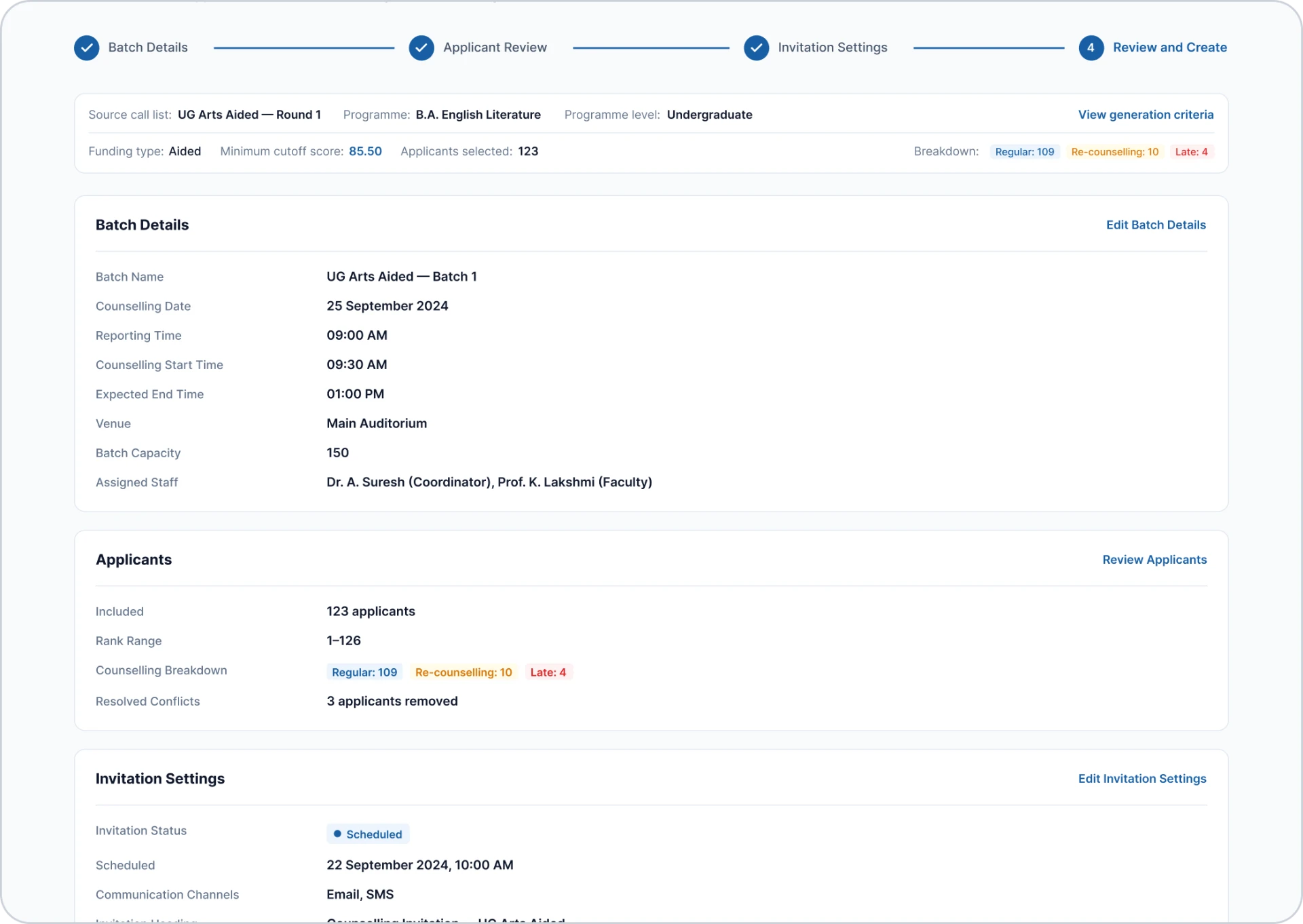
The batch flow brings together session details, applicant review, invitation settings and final confirmation. The review screen summarises the counselling date, reporting time, venue, capacity and included applicants before creation.
Design rationale
The aim was to give staff one place to check session arrangements and invitation details before creating the batch.
Review and create step of the batch flow summarising batch details for 25 September 2024 at the Main Auditorium, 123 included applicants and scheduled email and SMS invitations

D / Operations dashboard

Put today's work before the wider picture.

Context
Staff needed to follow live counselling, identify pending work and understand progress across the admission cycle.
Design response
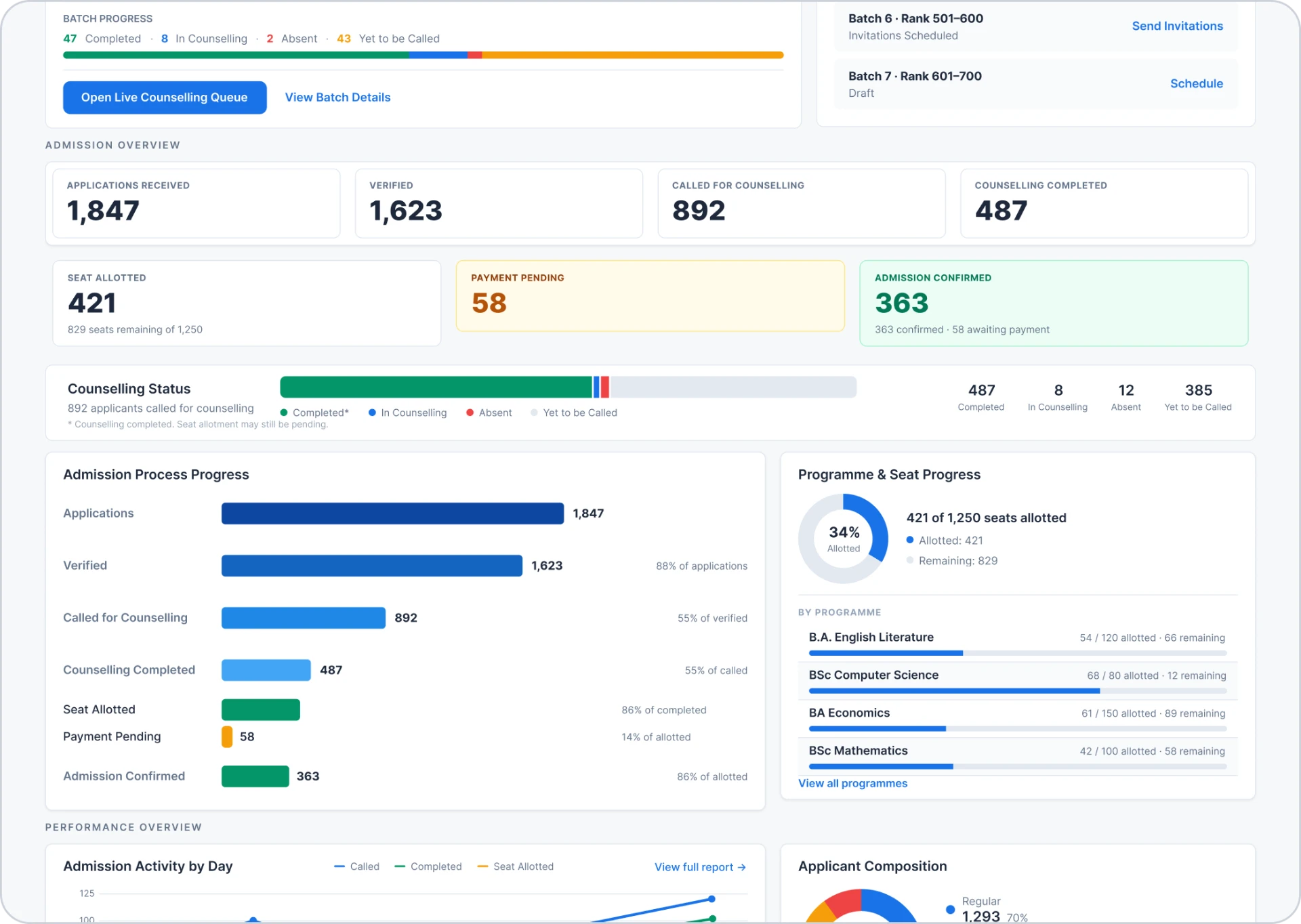
The dashboard places the active batch, counselling sessions and attention-required actions first. Admission totals, seat progress, performance charts and recent activity follow, with filters for the admission cycle, programme, funding type and batch.
Design rationale
The aim was to help staff identify immediate tasks before exploring broader progress, with direct links from operational summaries to the relevant work.
Dashboard showing batch progress with upcoming batches, an admission overview with totals for applications, verification, counselling, seat allotment, payment pending and confirmed admissions, a counselling status bar, admission process progress bars, programme seat progress by programme, and the start of performance charts for daily admission activity and applicant composition

E / Applicant search & verification

Identify the applicant before moving forward.

Context
Counsellors needed to find the correct applicant and check their details against supporting documents before proceeding to programme selection.
Design response
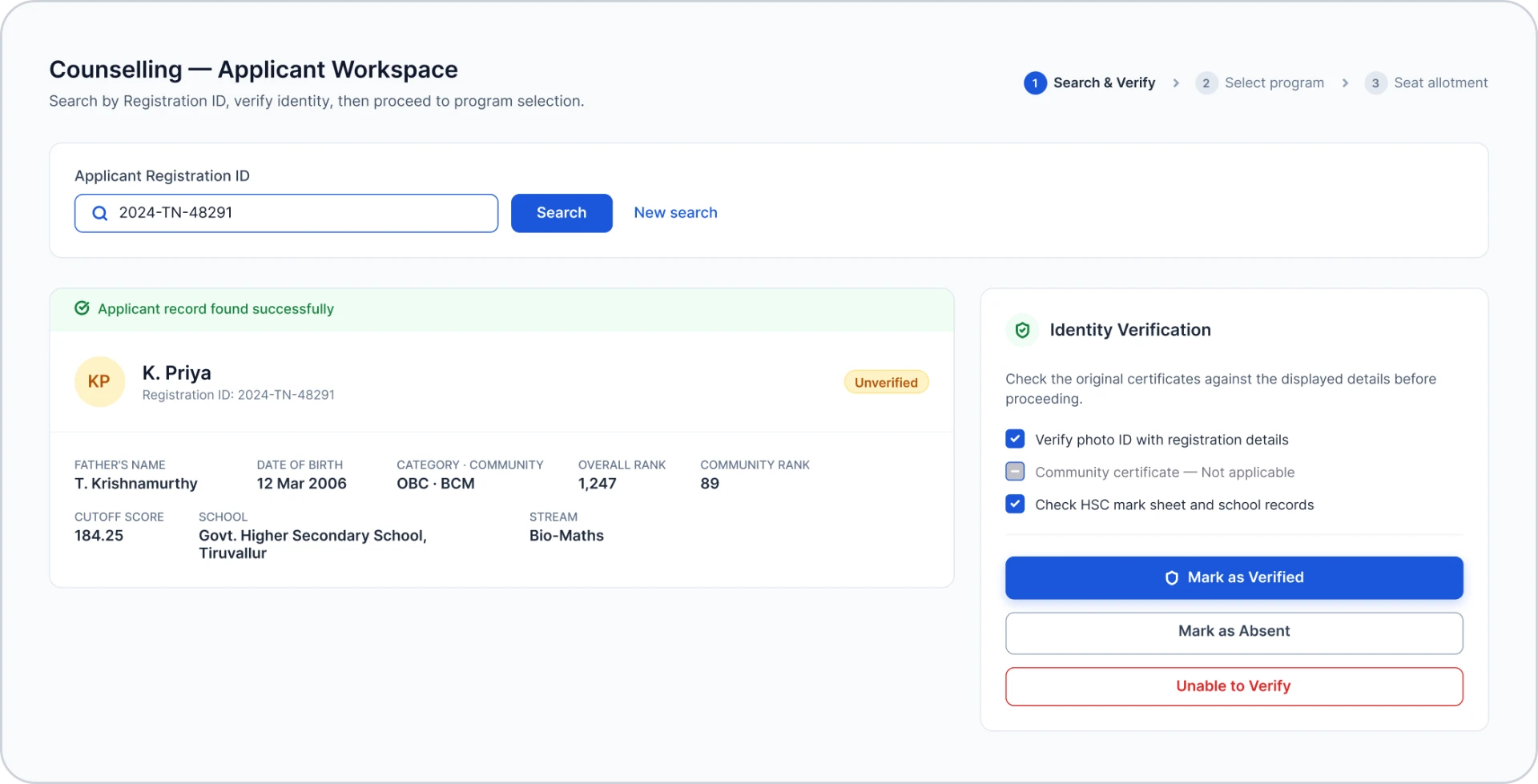
The workspace pairs registration-ID search and applicant details with a verification checklist. A visible unverified status distinguishes finding a record from verifying it, while ‘New search’ lets staff restart the lookup.
Design rationale
The aim was to keep identity checks alongside the applicant record and make it clear whether the applicant was ready to proceed.
Counselling applicant workspace with a registration ID search, the found record for K. Priya marked Unverified, and an identity verification checklist with Mark as Verified, Mark as Absent and Unable to Verify actions

F / Programme selection & seat availability

Make seat options visible at the point of choice.

Context
Counsellors relied on manual updates and cross-checks to confirm seat availability. Students needed to understand their eligible options during the counselling discussion.
Design response
The counselling interface brings eligible programmes and current seat availability into view, including unavailable options. The counsellor operates the interface while the student follows the same information on a mirrored screen.
Design rationale
The aim was to reduce reliance on verbal seat checks and help counsellors and students review the available choices together.
Programme selection for verified applicant K. Priya listing 12 eligible programmes with labelled seat counts such as 3 seats available and Closed · 0 seats, and a detail panel for B.Sc. Computer Science with 3 available seats

Shared visibility helps people understand their options. Allocation controls are also needed to prevent competing offers.

09 / Outcomes & limitations

What changed.
What remains unmeasured.

Project documentation reported a shorter admission cycle. The evidence below separates reported outcomes, documented system changes and potential benefits that were not measured.

Reported admission-cycle reduction

1–2 weeks → approximately 3 days

Reported in the project documentation. Underlying measurement records and comparison methodology were not available for this case study.

Source: College Admission System – Detailed Case Study.

Reported project outcomes

  • Admission cycle reduced from 1–2 weeks to approximately 3 days.
  • Elimination of manual seat-conflict resolution, as reported in the project documentation. This reflects documented seat-locking behaviour and was not independently verified.

Documented system changes

  • Shared preparation records for programme setup, call lists and counselling batches.
  • Shared seat information across counselling desks, with seat locking at system level.
  • On-screen applicant details that support verification. Staff still checked supporting documents.
  • A mirrored counselling display, so the student follows the same screen as the counsellor.

Potential benefits — not measured

  • Less waiting and uncertainty for students.
  • Easier handovers between staff.
  • Lower coordination effort between desks.

Evidence note

Dashboard figures shown in this case study are illustrative interface data, not outcome measures. No task-time, error-rate or satisfaction measurements were available.

10 / Reflection & next steps

Design across the process.
Validate in practice.

Admission preparation and live counselling depend on one another. The design needed to support both the staff coordinating the process and the students making a course choice.

Reflection

Coordination extends beyond one screen.

Programme setup, call lists, batches and counselling each carry information into the next activity. Designing these connections meant considering how staff understand progress, continue another colleague's work and guide students through a decision.

Next steps

Test the workflow with the people using it.

The next step would be to test preparation tasks, staff handovers, applicant verification and seat selection with admission staff, and check whether students can follow the mirrored counselling screen.

What to measure

Establish a baseline for task completion time, correction frequency, coordination issues and confirmation delays, then compare results after changes using consistent task definitions.